Step 2: Conversation Starters
Conversation starters are like the suggested questions a hotel concierge has printed on a card by the front desk — they show newcomers what they can ask without having to figure it out from scratch. In Nirvai, they're ready-made prompts that appear as clickable buttons when someone opens a chat with your agent. They help people understand what the agent can do and make it easy to get started without typing.
Why starters matter
When people first meet an agent, they often don't know what to ask. Starters fix this by showing concrete examples:
- They show off what the agent can do at a glance.
- They save effort — one click instead of typing.
- They point people toward the things the agent handles best.
- They set expectations about what the agent can and can't do.
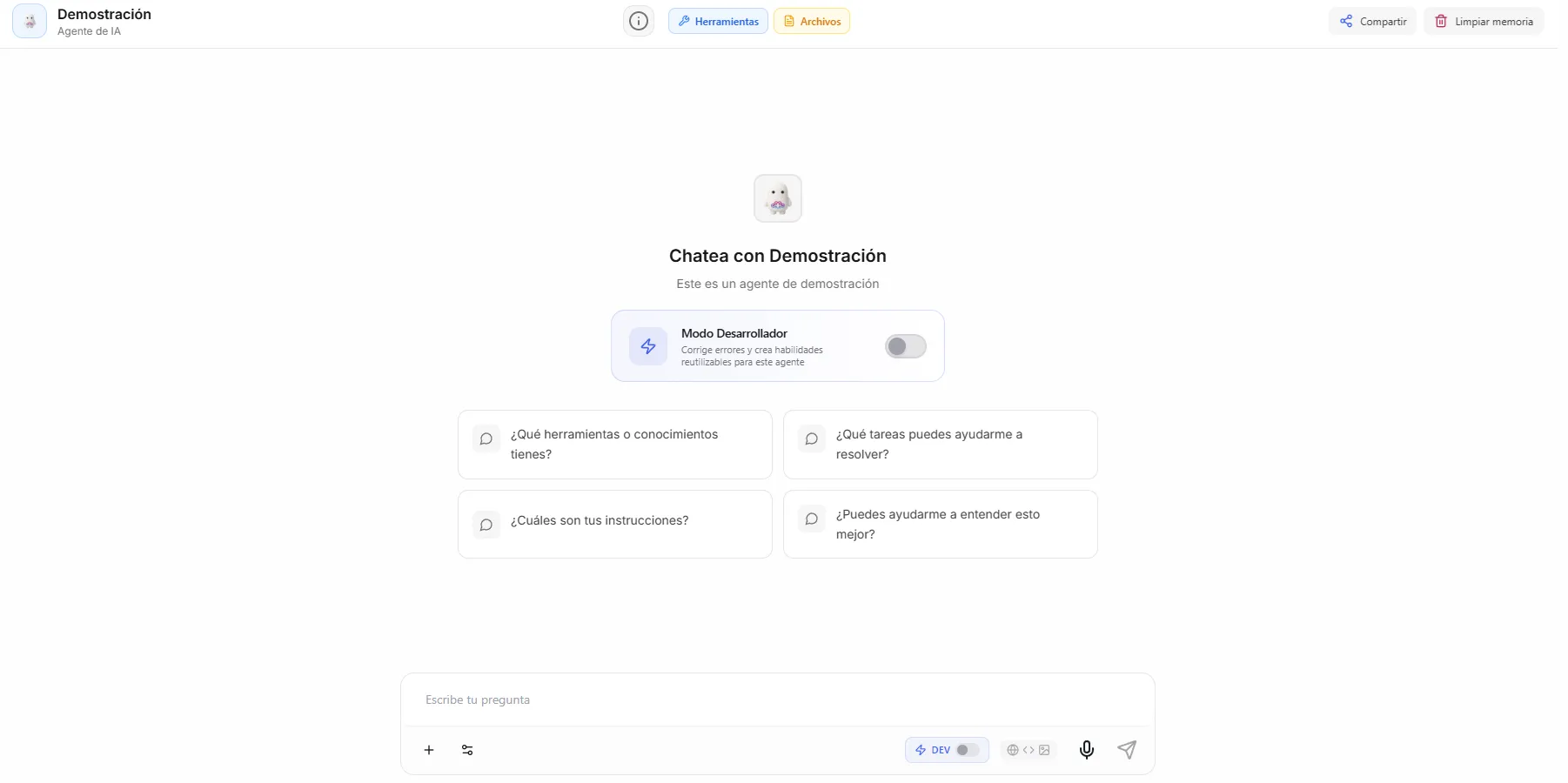 Image: Conversation starters appearing as clickable cards below the agent's greeting
Before you start
- This step is optional — you can skip it and come back later.
- It helps to have your agent's purpose clear first (from the Profile step), so your starters match what the agent actually does.
Step-by-step
- Click the Starters node on the creation canvas.
- Click Add Starter for each prompt you want to create.
- Write the prompt text — this is exactly what gets sent when someone clicks it.
Example starters by agent type
Customer support agent:
- "What's the status of my latest order?"
- "I'd like to request a return"
- "What are your business hours?"
- "Tell me about your warranty policy"
Research agent:
- "Summarize the latest news about [topic]"
- "Compare [product A] vs [product B]"
- "Find me statistics about [industry trend]"
HR assistant:
- "How many vacation days do I have left?"
- "What's the process for requesting time off?"
- "Explain our health insurance options"
Sales agent:
- "Tell me about your pricing plans"
- "What makes your product different from competitors?"
- "I'd like to schedule a demo"
Tips for good starters
| Do | Don't |
|---|---|
| Use natural, conversational language | Use robotic or overly formal phrasing |
| Cover the agent's main uses | Add starters for things the agent can't do |
| Keep prompts short (under 60 characters) | Write paragraph-length starters |
| Include 3–5 starters | Add more than 6 (too many choices means no choice) |
| Make each starter distinct | Write variations of the same question |
Think about the top three to five things people will most commonly ask your agent. Turn those into starters.
Where starters appear
| Where | How they show up |
|---|---|
| Nirvai Chat | Clickable cards below the agent's greeting |
| Web chat widget | Buttons or cards in the chat window |
| Channel messages | Not shown — people on channels start conversations freely |
Troubleshooting
| Problem | Fix |
|---|---|
| My starters don't appear in the chat | Starters only show in Nirvai Chat and the web chat widget, not in channels like WhatsApp. Confirm the agent is published to one of those. |
| There are too many starters and the chat looks cluttered | Trim down to three to five distinct prompts — more than six tends to overwhelm people. |
| Clicking a starter sends the wrong message | The starter text is sent exactly as written. Reopen the Starters step and edit the prompt text. |
What's next
After adding starters (or skipping them), click the Instructions node to continue to Step 3: Instructions.