Native Capabilities
Native capabilities are like the optional extras on a new phone: they're already built in, and you just switch on the ones you want. Each one gives your agent a new ability without you setting up any tools yourself.
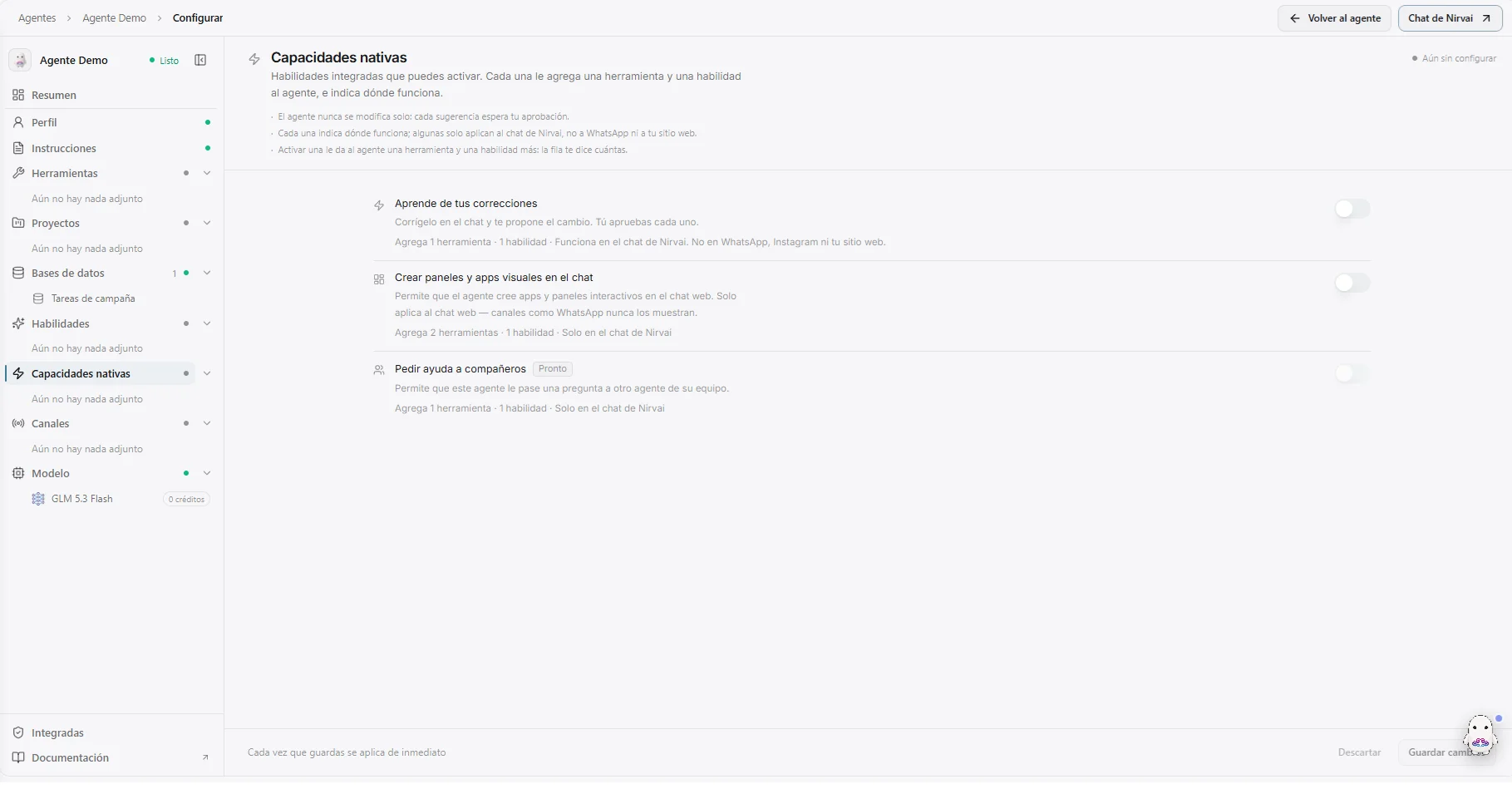 Image: The Native capabilities section: each ability with a switch, what it adds and where it works
What you can switch on
| Capability | What it does | Where it works |
|---|---|---|
| Learns from your feedback | Correct the agent in chat and it proposes a change to its own instructions or skills. You approve every one. | Nirvai chat only |
| Create visual dashboards & apps in chat | Lets the agent build charts, tables and small interactive apps inside the conversation. | Web chat only — channels like WhatsApp never show them |
| Ask teammates for help (Soon) | Lets the agent hand a question to another agent on its team. | Nirvai chat only |
To turn one on: in the builder, choose Native capabilities in the left menu, flip its switch, and save.
Good to know
- The agent never changes itself. With Learns from your feedback, every suggestion waits for your approval — nothing is applied behind your back.
- Each one adds to the agent's toolbox. Switching one on gives the agent one more tool and one more skill; the row tells you exactly how many.
- Check where it works. Some capabilities only apply in Nirvai's own chat, not on WhatsApp, Instagram or your website.