AI Agents
AI Agents are the core of Nirvai. Each agent is a personalized AI assistant that you configure with its own identity, knowledge, tools, and instructions. Think of agents as smart team members that you train for specific jobs — a support agent that knows your product, a sales agent that qualifies leads, or a research agent that summarizes documents.
Unlike a generic chatbot, every Nirvai agent has:
- A name and personality you define
- A knowledge base of your files and URLs it can reference
- Tools that let it take actions — search the web, manage calendars, query databases, call APIs
- Instructions that control exactly how it behaves, responds, and makes decisions
- Skills — advanced code-based capabilities you can install or create
- The ability to be deployed to WhatsApp, Instagram, Slack, your website, and more
What Can an Agent Do?
| Capability | Description |
|---|---|
| Answer questions | Using your knowledge base, instructions, and general knowledge |
| Search the web | Find up-to-date information from the internet |
| Use external tools | Interact with Google Calendar, Slack, CRMs, and custom APIs |
| Read and write databases | Query, insert, update, and delete records in your Nirvai databases |
| Process files | Analyze documents, spreadsheets, and images you share in chat |
| Run skills | Execute code-based capabilities for advanced tasks |
| Work in automations | Act as a step in multi-agent workflows that run on schedules or triggers |
Agent Architecture
Every agent runs on the same underlying system, but its behavior depends on how you configure it:
Agent Types
When you create an agent, Nirvai classifies it into one of two types based on your configuration:
| Type | When It's Used | Best For |
|---|---|---|
| Simple | No knowledge base added | Quick chatbots that rely on instructions and general knowledge |
| Simple with Knowledge | Has a knowledge base (files or URLs) | FAQ bots, support agents, document-grounded assistants, research agents |
You don't need to pick a type manually — Nirvai determines it automatically based on whether you add a knowledge base during creation.
Start with a Simple with Knowledge agent if you're new. Upload a few documents, write clear instructions, and test it in chat. You can always add tools and skills later.
The Agent Control Panel
The Agent Control Panel is where you create, configure, and manage all your agents. From here you can:
- Create new agents with a step-by-step wizard
- Start from a template for common use cases
- Edit any agent's configuration
- Test agents by chatting with them
- Deploy agents to channels like WhatsApp or Slack
- Manage skills, databases, and developer tools
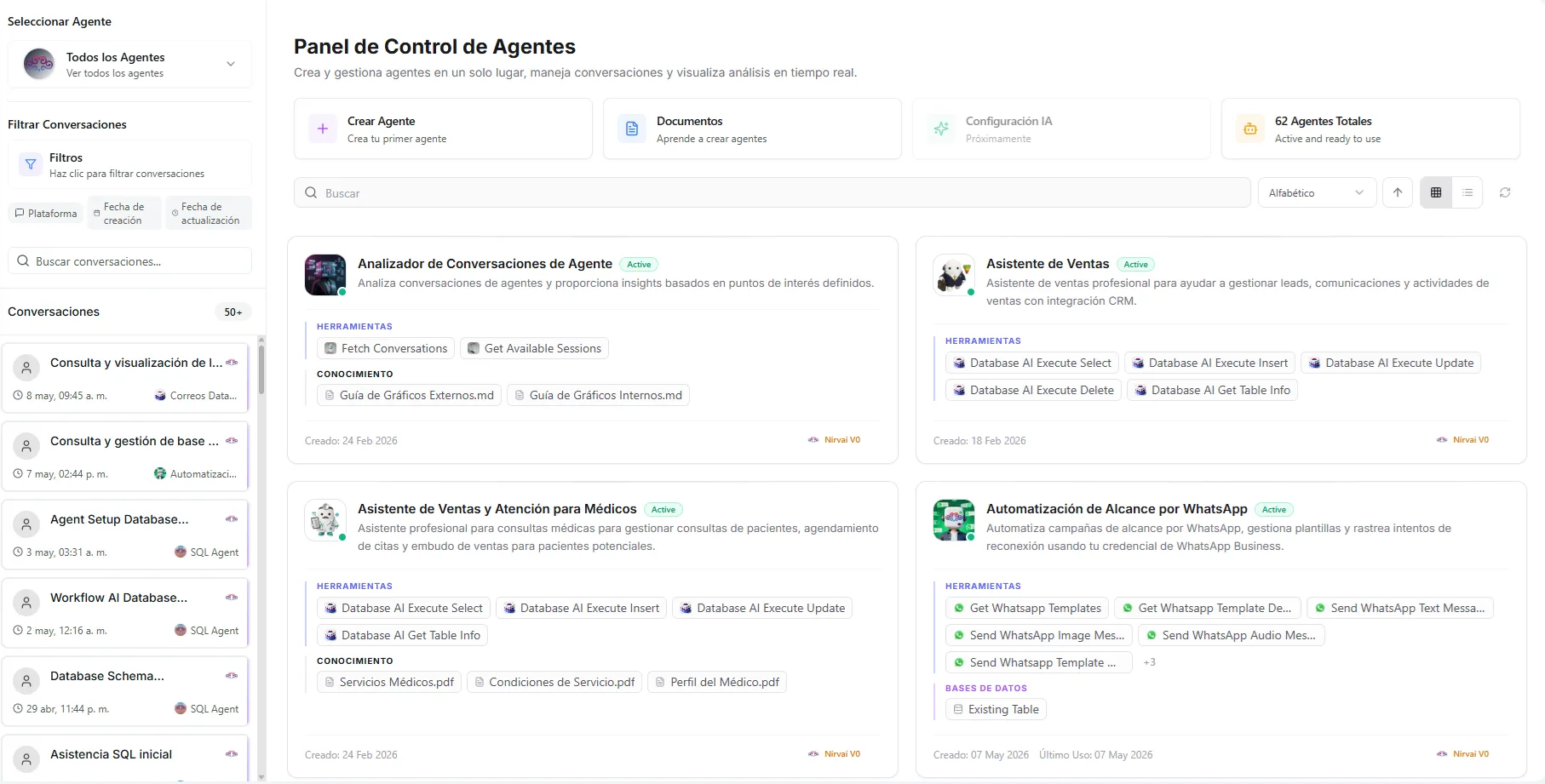 Image: The Agent Control Panel showing a grid of agent cards with their status, tools, and channel connections
Creating Your First Agent
The creation flow uses a visual canvas where each step is a node you can click. The eight steps are:
- Profile — Name, description, avatar, and conversation starters
- Instructions — Define behavior, tone, and rules
- Tools — Connect external services and APIs
- Knowledge Base — Upload files and URLs
- Databases — Connect Nirvai databases with permission levels
- Skills — Install community or custom skills
- Channels — Deploy to WhatsApp, Slack, your website, and more
- Finish — Review and finalize your agent
The canvas also displays your agent's system capabilities — Web Search, Python, Vision, Calendar, Files, and Memory — so you can see at a glance what your agent can do.
Saving the Profile step creates the agent in the system. From there, each step saves individually as you complete it — you can navigate freely between nodes without losing your work.
Don't want to configure everything manually? Use an Agent Template to start with a pre-built configuration that you can customize.